


TikTok added Stories so you can share quick updates that disappear after 24 hours. Many creators post behind-the-scenes clips, short tips, or teasers that hint at new content. If you work with the TikTok Stories feature, you likely want to know who’s viewing those posts and how story views work.
This guide explains what you can and cannot see, how to find the viewers list, how profile view history relates to stories, how to adjust your privacy setting so the right people see your updates, and what to do if you want more insight without exposing your own view history.
What are TikTok Stories?
TikTok Stories behave like regular short posts, yet they live in a separate space. You can post stories on TikTok from the Create screen, and they appear around your profile picture and in the Following feed.
Anyone who can view your TikTok account can view your stories as well, unless you restrict your audience with a private account or friends-only options in your privacy setting.
Stories on TikTok disappear after 24 hours. The story view total and the list of story viewers remain available while the story is live. Once the story expires, you will not see new views for that post. You can download the story video before it expires if you want a copy for your files, or you can repost it as a regular TikTok video if it fits your content plan.
Can You See Who Viewed Your TikTok Story?
Yes. TikTok lets you see who viewed your story. While the story is live, you can open the story view panel to see a list of viewers. TikTok’s own help pages explain that you can see the total number of story views and the accounts that watched your story, and you can access the list by swiping up on the story screen.
You can also see who engaged with the story, such as replies or reactions, during the 24 hours. The viewers list shows accounts that viewed your TikTok stories without the need for you to enable a separate feature.
TikTok does not notify viewers with a push alert when you view their story, yet your username appears in the viewers list. That means someone can still see that you viewed their story even if you keep other view settings turned off. The key point is simple: story view identity is visible to the creator while the story remains live.
How To See Your TikTok Story Viewers List?
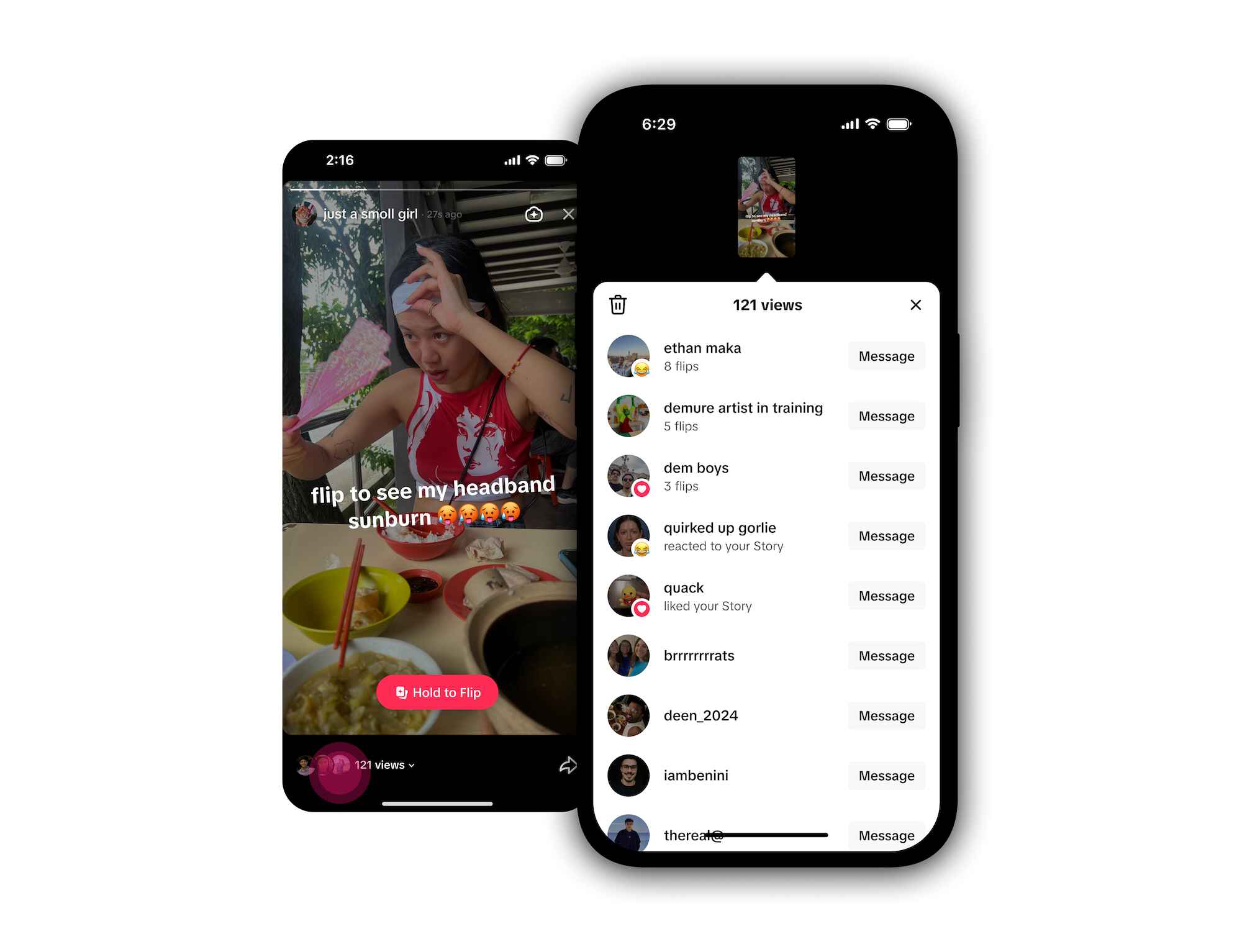
Follow these steps in the TikTok app to see who viewed your TikTok stories:
- Open the TikTok app and log in to your TikTok account.
- Tap the profile icon in the bottom right corner to open your TikTok profile.
- Tap your profile picture at the top, or tap your story ring if you see one around your profile picture.
- Select the story you want to check.
- Look at the bottom of the screen to see the total story view count.
- Swipe up to open the viewers list and see who viewed your TikTok story.
If you want to track your story during its full 24 hours, repeat the steps to monitor changes. You can refresh to see if more people have watched since your last check.
What About Regular TikTok Videos?
The rules for a TikTok video work differently. You can see how many people viewed a video, but you cannot see a complete list of users who watched it.
TikTok’s guidance and multiple 2025 explainers confirm that you only get aggregate view counts and engagement signals like likes, comments, and shares for regular posts. There is no full list of video viewers by username.
If you want more insight on performance, use Analytics inside the app. Analytics show watch time, follower activity trends, and traffic sources. These reports help you measure engagement even when you cannot see who viewed a particular TikTok video by name.
How Profile View History Relates To Stories?
TikTok includes a separate feature called Profile view history. When you turn on profile views, you can see which accounts visited your profile in the last 30 days, but only when both you and the visitor have this setting turned on.
TikTok notes that the feature is available for accounts owned by users 16 or older and with fewer than 5,000 followers. If you visit another account with profile views enabled, your visit appears on their list as well.
Profile views do not control the story viewers list. You can see who viewed your TikTok story even if profile view history is off, because story viewers appear on the story itself. Profile views only cover visits to the profile page. That said, profile views can help you spot patterns, like someone who viewed your story and then checked your profile.
TikTok also offers Post view history, which can show when someone you follow, who also enables the feature, viewed your posts. This option does not change the rule about regular videos lacking a public viewers list for everyone, yet it can reveal viewing activity among mutual connections who opted in.
Step-By-Step: Turn On Profile Views And Check It

If you want to see which TikTok profile viewers have visited your page, try this:
- Go to your profile and look at the top right corner.
- Tap the footprint icon or open the menu and find Profile views.
- Enable profile view history.
- Return later to see the list of viewers from the past 30 days.
Remember the limits: both parties must have the feature on, and the history applies to profile visits, not regular video plays or story view counts.
Privacy And Visibility: Control Who Can View Your Stories
You control who can view your stories and videos by setting your account and post-level audience. Use these steps to adjust your settings:
- Open your profile, tap the menu in the top right corner, and choose Settings and privacy.
- Select Privacy to change who can view your posts and stories on TikTok.
- Pick Public, Friends, or Private options. A private account requires follow requests, and only approved followers can view your stories and videos.
If you want your audience to engage with the story, choose Public or Friends and invite replies. If you want a narrow group, use a private account or restrict the post to Friends. People see your stories based on these controls, and you can change them any time.
Will TikTok Notify Someone When You View Their Story Or Profile?
TikTok does not send a push notification that names you when you view someone’s story. Your username still appears in the story viewers list while the story is live. TikTok also does not send a push alert every time you visit a profile, and you will only appear in the Profile view history if you and the other account have that feature enabled.
If you do not want someone to see that you visited their profile, turn off your own profile view history. When you switch it off, your future visits will not appear in the other person’s list, and you will also lose access to your own list until you turn it on again. Keep in mind that story viewers remain visible to the creator while the story is active, and the profile views toggle does not hide story viewing.
How TikTok Story Views Work In Practice?
When you open a story, TikTok adds your account to the story viewers list. The creator can see your username in that list during the 24 hours. The list updates over time as more people view your stories or their stories. You can also see replies that come in through the story, which adds more context to the viewer list.
Creators who want to engage with their audience can use the viewers list to reply, follow back, or invite an interaction. For example, you might tap on a viewer’s profile, check their latest TikTok video, and leave a short comment to build a connection.
You can keep a simple record of story view spikes by noting the time you posted and the view count after one hour, six hours, and near the 24-hour mark. This approach will not track every profile view, yet it gives you insight into how people have watched your story over time.
Tips To Track Your Story Without Crossing Privacy Lines
- Keep your audience settings clear. Decide if you want Public, Friends, or a private account. This sets expectations for visibility and interaction.
- Use Analytics for performance. Analytics offer a deeper look at engagement without exposing viewer identities for regular posts. Review average watch time and traffic sources to plan new content.
- Avoid third-party “profile viewer” apps. Many tools promise to reveal who’s viewing your profile or video without proper permission. These claims are risky. Stick with the in-app viewers list and official features.
- Respect viewer privacy. Do not call out someone by username in a way that breaks trust. Invite feedback and conversation instead.
- Share behind-the-scenes clips. Stories work best for quick, human updates that prompt interaction. Use captions to ask a clear question and encourage viewers to engage with the story.
[Bonus] Get Real TikTok Video Views Fast

If you want a quick boost while you work on your content plan, you can add paid views to support early momentum. A steady stream of viewers can help your TikTok video reach more people as you post on a regular schedule.
We recommend likefy if you want to buy TikTok views. They focus on real activity and give you control over how the views roll out.
- Real TikTok Profiles: Views come from real international TikTok users, so the numbers align with natural activity.
- Country Targeting: Choose international reach or German Premium TikTok views to match your audience.
- Quick Delivery: Orders start within a few minutes, which helps you test posts in the first hour.
- Flexible Splits: You can split a package across several posts to balance your view history.
- Audience Options: Select the origin and gender of the views, with “Male & Female” marked as the recommended mix.
Use paid views to seed attention, then follow up with strong storytelling, clear captions, and replies that engage your audience. This mix helps you earn lasting engagement while you grow your profile.
FAQs
Can I see who viewed my TikTok story after it expires?
No. Stories disappear after 24 hours, and you cannot open a new viewers list once the story ends. Take notes or screenshots during the 24 hours if you need a record.
Can I see who viewed my regular TikTok video?
No. You can see view counts and engagement data, yet you cannot see a list of usernames for a public TikTok video.
Can someone see that I viewed their story if I never liked or commented?
Yes. The viewers list shows accounts that watched, even without interacting. The creator can see your username while the story remains live.
Can I find out who’s viewing my profile?
Yes, with limits. Turn on profile view history in Settings, and you will see accounts that visited your profile in the past 30 days, as long as both of you have the feature enabled and your account meets the age and follower rules.
Does TikTok notify someone when I view their profile?
Not as a push alert. Your visit may appear in their Profile views tab if both of you have profile view history enabled.
Conclusion
You can see who viewed your TikTok story while it stays live for 24 hours. Open your story from the ring around your profile picture, swipe up, and read the viewers list. Use your privacy setting to control who can view your stories, and turn on profile view history if you want more context about visits to your TikTok profile. Remember that a regular TikTok video shows only counts and engagement.
For a quick, safe boost, we recommend likefy to buy TikTok views. They use real users, deliver within minutes, offer international or German Premium options, and let you split a package across posts to build steady momentum.


