


Creators thrive when viewers send appreciation in a way that also helps the creator earn. TikTok coins and gifts support that goal. A viewer buys coins, spends those coins on a gift, and TikTok converts that gift into diamonds and later into cash for the creator. In this guide, we will learn how to exchange TikTok gift to coins.
New users often confuse coins and gifts, or think they can convert gifts directly back into coins. In truth, the flow is one-directional: coins > gifts > diamonds > cash.
TikTok’s Virtual Economy in Plain Words
TikTok runs on an internal money system that feels like an arcade. You add funds, the app gives you tokens (coins), and you trade those tokens for digital items (gifts). While a real arcade gives out plush toys, TikTok gives digital images such as Roses or Ferris Wheels. Even though the pictures look playful, each one has a fixed price in coins and therefore in U.S. dollars.
Coins
- You buy coins in bundles through TikTok’s payment system.
- One coin costs about 1.4 cents. Prices can shift with taxes and app-store fees, but the platform bases all coin math on that core value.
Gifts
- Gifts appear as colorful stickers during live sessions or in the comment space of a video.
- The app shows the coin price under each gift icon, so viewers know the cost at a glance.
Diamonds
- TikTok converts every gift a creator receives into diamonds.
- The conversion rate is two coins per diamond.
Cash
- Creators can withdraw cash once their diamond value reaches at least \$100.
- TikTok keeps 50 % of the diamond value as its service fee.
This closed loop keeps payments secure. It also means that you cannot skip parts of the chain. For example, you cannot trade diamonds straight back to coins, and you cannot hand gifts to another viewer. Everything moves step by step inside one account.
Gift Value at a Glance
Below is a short reference list. These numbers come from TikTok’s public coin prices. Use the table to see how much a single popular gift costs the sender and how that cost changes once TikTok claims its share.
| Gift Name | Coin Cost | Coins in USD | Diamonds Earned | Cash Creator Can Withdraw* |
| Rose | 1 | $0.014 | 0.5 | $0.0035 |
| Finger Heart | 5 | $0.07 | 2.5 | $0.0175 |
| Panda | 5 | $0.07 | 2.5 | $0.0175 |
| Fireworks | 999 | $13.99 | 499.5 | $3.50 |
| Ferris Wheel | 3,000 | $42.00 | 1,500 | $10.50 |
| Lion | 29,999 | $419.99 | 14,999.5 | $104.99 |
| TikTok Universe | 34,999 | $489.99 | 17,499.5 | $122.49 |
*Figures rounded for clarity. TikTok keeps half the diamond value.
Buying Coins — Your First Transaction

Before you give a gift, you must own coins. Follow these direct steps:
- Open TikTok and log in to your personal account.
- Tap Profile at the bottom right.
- Hit the three-line menu (or three dots, depending on your phone).
- Tap Balance.
- Choose Recharge.
- TikTok shows preset bundles (for example 70 coins, 350 coins, and so on). Pick one.
- Confirm the payment through your device’s app-store checkout.
Your coin balance updates in seconds. The amount appears next to your profile photo when you watch a live stream. Now you have the power to send gifts.
What Happens After the Gift Arrives? From Gift to Diamond
Think of a gift as a coupon that the creator redeems backstage. TikTok handles the math. When the gift lands:
- TikTok removes the animation from the total coin supply.
- It divides the coin price by two.
- The result equals the diamond credit that appears on the creator’s account.
For example, a Fireworks gift costs 999 coins. TikTok splits 999 by two, so the creator sees 499.5 diamonds. (The system rounds halves, but the small fraction does not block payouts over time.)
TikTok then holds the diamonds until the creator builds enough for a cash withdrawal. The platform’s split keeps the economy balanced: both the app and the creator share the revenue.
Withdrawing Diamonds — Completing the Income Cycle

Creators turn diamonds into money once they meet three checkpoints:
- Eligibility
- Personal account (not business).
- Member of Creator Next.
- At least 18 years old.
- More than 1 000 followers and 30 days of account age.
- Located in a region where TikTok coins are active.
- Follow TikTok rules and live-stream guidelines.
- Diamond Minimum
- The balance must show at least $100.
- Withdrawal Limit
- One creator can withdraw up to $1,000 per day.
When the creator meets those checks:
- Go to Settings > Balance.
- Tap LIVE Gifts or Income (the label can differ).
- Choose Withdraw.
- Select a linked PayPal or bank account.
- Confirm.
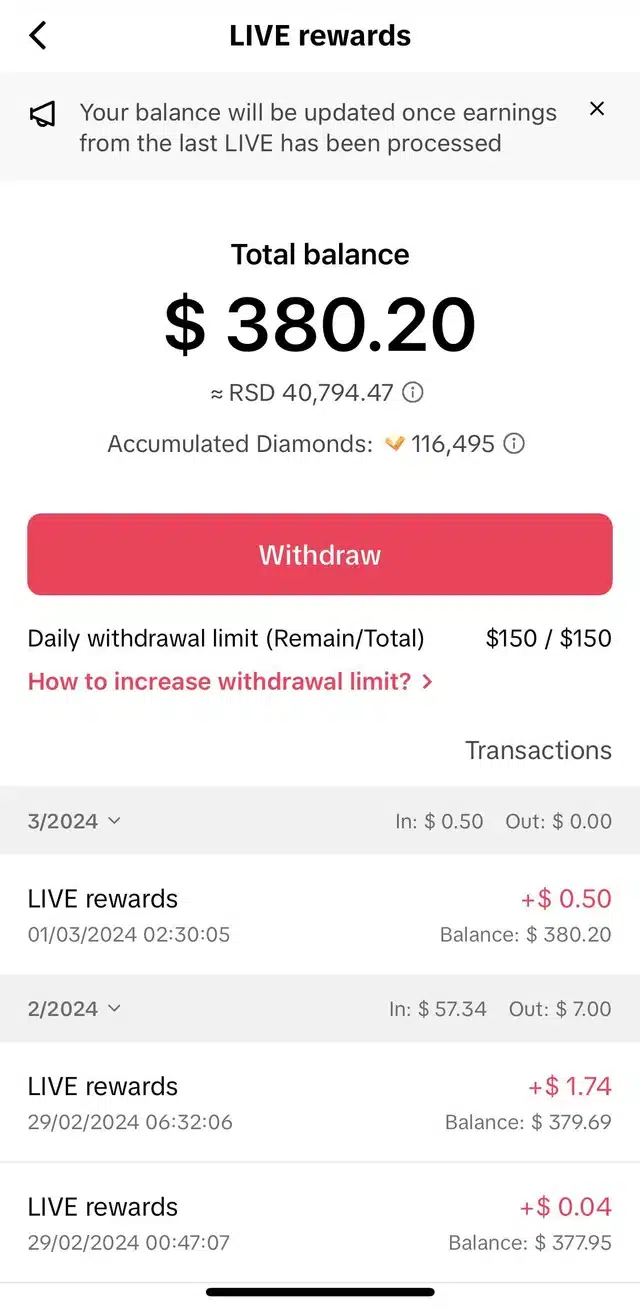
The bank can take a few business days to show the transfer. TikTok sends email or in-app notices once the payment clears.
Why “Exchange Gift to Coins” Sounds Backwards
New users often say “I want to exchange my gifts back to coins.” In practice, TikTok does not support that motion. Once a viewer spends coins, those coins leave the viewer’s wallet for good. They break into two halves:
- Part becomes diamonds for the creator.
- Part becomes TikTok’s service fee.
Coins never move in the other direction. Coins reach an end point the instant someone presses Send Gift. If you sent a gift by mistake, TikTok does not reverse it into coins or cash. Always double-check before you tap Send.
What If a Viewer Still Has Gifts but Wants Coins?
Some users ask if they can cancel or convert a gift not yet accepted by the creator. TikTok’s policy states:
- Gifts appear instantly. They do not wait for creator approval.
- No refund exists once the gift animation appears.
- If TikTok finds that the transaction breaks its terms (for example credit card fraud), the platform may remove the diamonds from the creator and issue a chargeback, but this happens only through TikTok’s own fraud checks. The average user cannot trigger it on demand.
If you want coins again, you must buy them through Recharge. Treat every coin purchase as final and every gift as permanent. Proper budgeting avoids regret later.
Growth Tips for Creators Who Want More Coins Sent Their Way
- Promote Upcoming LIVE Sessions in short teaser videos. Viewers plan to attend and save coins in advance.
- Engage With Chat in real time. Questions, song requests, or quick polls keep energy high.
- Run Theme Nights. For example, “’90s Music Thursday” or “Sketch Sunday” gives your stream a clear hook.
- Celebrate Milestones publicly. Use a fun overlay when you hit 10 000 diamonds.
- Upgrade Production. Clear sound and good lighting show respect for your audience’s time.
The Bottom Line
TikTok’s mix of coins, gifts, diamonds, and cash looks complex at first. Yet the system follows one simple lane:
Buy coins > send gifts > gifts turn into diamonds > withdraw cash.
Viewers can only move forward, and creators can only convert diamonds to money. No official path lets anyone swap a sent gift back into coins. Knowing that rule prevents confusion and builds trust on the platform.
With good planning, both sides gain. Fans enjoy a direct way to support the voices they love, and creators turn authentic moments into real earnings. Follow the steps in this guide—buy coins responsibly, send gifts wisely, stream often with clear calls to action, and mind TikTok’s guidelines. When you respect each link in the chain, you unlock the full value of TikTok’s virtual economy.


2 Comments
I understand 👍
I want to Gift exchange to coin